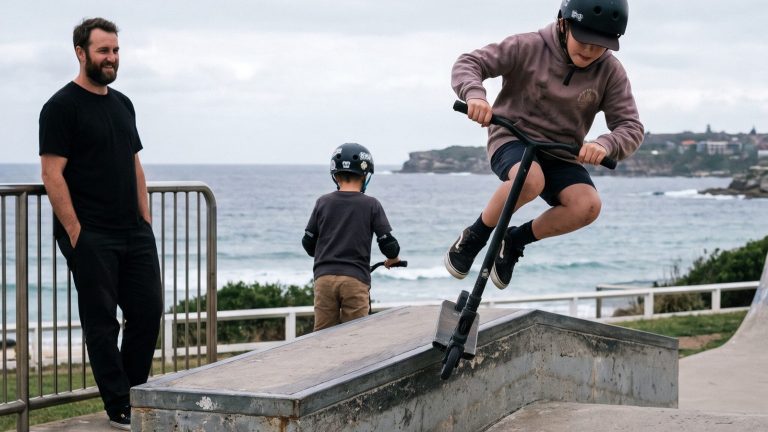

For over 40 years, WAYS Youth & Family has supported young people and their families across Sydney’s Eastern Suburbs.
Supporting Youth. Empowering Futures.
We help young people thrive through education, wellbeing, and life skills.
Supporting young people and families to thrive, learn, and belong
WAYS is a community based organisation supporting children, young people, and families through education, care, and wellbeing services.
We work alongside families to create safe, structured, and supportive environments where young people can build confidence, develop skills, and reconnect with learning in ways that work for them.
Our programs span early learning support, out of school hours care, education pathways, and youth wellbeing services. While each program is different, they are all grounded in the same values: trust, respect, consistency, and genuine care.
At WAYS, we see the whole person. We believe strong relationships, clear structure, and meaningful engagement are the foundation for positive outcomes, both in and out of the classroom.
Parents and carers are valued partners in everything we do.
WAYS works alongside young people and families to create safe, supportive pathways through education, care, and wellbeing. The impact of this work is reflected in the trust of our community and the outcomes achieved each year.
“We finally felt supported and understood. WAYS made a real difference for our child and our family.”
This form takes around 15 minutes. Your progress saves automatically so you can pause and come back. Tick off what you have — you don’t need everything to begin, but the more you have ready the smoother it’ll go.
About your child
Child’s Centrelink CRN
9 digits + a letter — your child’s CRN, not yours. Find it on myGov or any Centrelink letter.
💡 Don’t have it? You can use 123456789A as a placeholder — our team will follow up with you to get the correct one before your CCS is applied.
Required
Child’s date of birth
Ways OOSH accepts children aged 7–12 years.
Required
Child’s birth certificate
A scan or photo to upload — PDF, JPG or PNG.
💡 Can’t find it right now? You can submit without it and email it to [email protected] afterwards.
Required
Recent photo of your child
Used by educators to identify your child, and required for any medical action plans.
Required
Parent & family details
Your Centrelink CRN
Your own CRN for Child Care Subsidy (CCS) purposes — separate from your child’s.
Required
Contact details for emergency contacts
Anyone who might collect your child — name, mobile, address. Think aunties, uncles, grandparents, neighbours.
Required
Photo ID for each emergency contact
A photo of their driver’s licence or similar — helps staff verify identity at pick-up.
Required
Court orders or parenting plans
If applicable — we can only enforce complete documents, so please have all pages ready to upload.
If applicable
Health & medical
Medicare card
Medicare number, expiry date, and your child’s position number on the card.
💡 Not eligible for Medicare? Enter 0000000000 as the number — our team will note this on your file.
Required
Immunisation history statement
Download from Medicare via myGov — search “AIR Immunisation History Statement”. Must be current.
💡 Haven’t got it yet? You can submit without it and upload later — but your child cannot attend until we receive it.
Required
Medical action plan
Required if your child has anaphylaxis, allergies or asthma. Must be signed by a doctor and dated within the last 12 months. Download ASCIA forms from allergy.org.au or asthma plans from asthmaaustralia.org.au.
If applicable
GP & dentist details
Practice name, phone number and address. Not mandatory but helps us act quickly in an emergency.
Optional
Child Care Subsidy (CCS)
CCS assessment completed on myGov
Complete the CCS activity test on the myGov website. Takes about 10 minutes.
💡 Haven’t done it yet? You can still submit this form — tick “not yet” in the CCS section and our team will guide you through completing it. Don’t let this stop you.
Required
CCS confirmation letter
The letter from Centrelink confirming your CCS eligibility and entitlement percentage.
Required
PHASE 1Quick — takes about 1 minute
What type of care do you need?
Select the type of care you need — after school care, vacation care, or both. You can change this any time before submitting.
Select all that apply
✓
🎒
After School CareRegular weekly bookings after school, during term time. Select your permanent days below.
✓
☀️
Vacation CareSchool holiday bookings only. Book individual days during each holiday period.
✓
✨
Both — After School & Vacation CareEnrol for regular weekly care during term time plus school holiday days.
📅 Vacation Care — booked separatelyVacation Care days are not selected here. Once enrolled, you’ll book individual holiday days directly through Owna (our parent portal) before each school holiday period.
Mon
Tue
Wed
Thu
Fri
These recur every week during term time only. Vacation Care days are booked separately through Owna.
PHASE 2About your child
Tell us about your child
Please double-check the date of birth and CRN — these are used to apply your Child Care Subsidy and errors will cause delays.
WAYS OOSH accepts children aged 7–12 years.
9 digits + a letter. Your child’s CRN — not yours. Find it on myGov or any Centrelink letter.
Two situations:
• Can’t find it right now? Check myGov, the Centrelink app, or any letter from Centrelink. It looks like: 123456789A
• Not eligible for Centrelink? Enter 123456789A as a placeholder — our team will add a note and it won’t hold up your enrolment.
Either way — don’t leave it blank.
School not listed? Select that option — we’ll reach out to check if we can accommodate collection.
PHASE 3 · 1 of 3Primary parent or guardian
Parent / Guardian 1
The primary parent should be whoever is linked to the child’s Centrelink CRN — this is who the Child Care Subsidy will be applied to.
ℹ️In split families, either parent can apply for CCS. It doesn’t need to be the parent who spends the most time with the child — it just needs to match the CRN you entered on the previous step.
10 digits, no country code. International? Email us after submitting.
Can’t find it? Leave blank — our team can add it later once you locate it.
PHASE 3 · 2 of 3Optional — skip if not applicable
Parent / Guardian 2
If there’s a second parent or guardian, add their details here. If not, just click Continue — this step is optional.
💡Adding a second parent means we have someone else to contact if we can’t reach Parent 1, and they can do pick-ups without us needing to call you each time for permission.
PHASE 3 · 3 of 3Emergency contacts & additional info
Contacts & additional information
Add anyone who may collect your child or be contacted in an emergency.
💡Think ahead — aunties, uncles, grandparents, neighbours, family friends. If someone arrives who isn’t on this list, we’ll need to call you first before releasing your child.
Emergency contact 1 * Required
Give medical consentIf we can’t reach a parent first
Consent to transportIncluding excursions and outings
Consent to leave premisesIn emergencies or evacuations
Consent to regular outings
Be notified in emergencies
Collect child
Emergency contact 2 (optional)
Give medical consent
Consent to transport
Consent to leave premises
Consent to regular outings
Be notified in emergencies
Collect child
Additional child information
Court orders & parenting arrangements
📄
Click to upload or drag and drop
PDF, JPG or PNG — complete documents only
📁 Files are uploaded securely to Google Drive and linked to your enrolment record for the team to review.
PHASE 4Health & medical details
Medical information
Required under Education and Care Services regulations. This information helps us act quickly and safely if your child needs medical attention.
Medicare
Enter 0000000000 as the Medicare number and 01/2099 as the expiry date. Our team will note this on your file — it won’t block your enrolment.
GP & dentist (optional but helpful)
Medical conditions * All required
🚨We cannot process your enrolment without a current medical management plan. It must be dated within the last 12 months, include a photo of your child, and you must confirm the correct labelled medication will be provided at the service.
📎
Click to upload or drag and drop
Must be dated within the last 12 months
⚠️A GP letter or asthma action plan is required — even for post-viral or reactive asthma where there’s no formal diagnosis. If your child has a puffer, we need documentation.
📎
Click to upload
Immunisation * Required
If yes, approved documentation must be provided before your child can attend. See our Immunisation Policy.
💉
Click to upload or drag and drop
Download your AIR history statement from myGov
Cultural & language background (optional)
PHASE 5 · 1 of 4Agreements & permissions
Agreements & permissions
The medical authorisation and CCS sections are mandatory. Photos and activity permissions are your personal choice.
CCS eligibility * All required
My child is in my care for the purpose of this enrolment
I am liable for the fees for this child
I meet the CCS residency requirements
My child meets the immunisation requirements
I have completed the CCS activity test assessment
I have received my CCS confirmation letter
Medical authorisation * Required
Collect my child if they become unwellI agree to collect within a reasonable time
Seek medical treatment from a registered practitioner or ambulanceNominated supervisor may act without waiting to contact me
Acknowledge:
Seek dental treatment if requiredUsing dentist details provided, or our preferred provider
Acknowledge:
Transport my child in an emergencyI agree to reimburse any necessary expenses
Administer Epipen or puffer without contacting me firstWe will call immediately afterwards — this is for emergencies only
Activities * Required
Excursions & regular outings
Emergency evacuationsMy child may be taken from the premises in a genuine emergency
Sunscreen applied by staff
Band-aids & basic first aid applied by staff
Insect repellentSupplied by parents — applied by staff when needed
Surfing & skateboarding activities
Photos & video — your preference
For internal staff trainingNot shared outside the organisation
Learning stories shared with familiesShared via the Owna app with your family
Shared with other services for training
WAYS OOSH website & social media
Personal viewing onlyFor your own records — not shared externally
Final agreements * Required
I have read (or will read) the parent handbookAvailable in the Owna app after enrolment is approved
I agree to the technology & device policyChildren must not access social media and must ask permission before photographing others at the service
PHASE 5 · 2 of 4Attached documents
Upload your documents
Upload the documents listed below. All files are stored securely in Google Drive and linked to your enrolment record. Your team can access them during the approval process.
ℹ️Accepted formats: PDF, JPG, PNG. You can upload multiple files per slot. Files upload instantly when selected — wait for the file name to appear before submitting.
Required documents
💉
Click to upload or drag and drop
Download from AIR via myGov
📋
Click to upload or drag and drop
📷
Click to upload or drag and drop
JPG or PNG — clear, recent photo
🪪
Click to upload or drag and drop
One file per contact — you can upload multiple
Conditional documents upload if applicable
🏥
Click to upload or drag and drop
ASCIA action plan, asthma care plan or medical management plan
🍽️
Click to upload or drag and drop
⚖️
Click to upload or drag and drop
Complete documents only — partial orders cannot be enforced
🏠
Click to upload or drag and drop
📁 All files are uploaded securely to a dedicated Google Drive folder for your child. Your WAYS OOSH team can access them during the enrolment review process.
PHASE 5 · 3 of 4Payment preferences
Direct debit details
We don’t collect your card or bank details here — that’s done securely through Owna after your enrolment is approved. This step just captures your billing preferences and your agreement to the direct debit terms.
ℹ️Child Care Subsidy (CCS) is paid directly to the service to reduce your fees. The amount you pay will reflect your subsidy entitlement once your enrolment is approved and CCS is applied.
Payment preferences * Required
Your actual card or bank details will be entered securely in the Owna app after enrolment approval.
Agreements * All required
Direct Debit Service Agreement Read before agreeing
+
This is your Direct Debit Service Agreement with Cloud Payments ACN 154 014 785, APCA User ID Number 502574. Cloud Payments have been contracted by OWNA Corp Pty Ltd to collect the instalments due under this Agreement.
Definitions
account — the account held at your financial institution from which we are authorised to arrange for funds to be debited.
banking day — a day other than a Saturday, Sunday or public holiday listed throughout Australia.
debit day — the day that payment by you to us is due.
us / we — OWNA Corp Pty Ltd.
Debiting your account
By providing a valid instruction, you have authorised us to arrange for funds to be debited from your account as authorised in the Direct Debit Request. If the debit day falls on a non-banking day, we may direct your financial institution to debit your account on the following banking day.
Amendments
We may vary any details of this agreement at any time by giving you at least 14 days written notice. You may change, stop or defer a debit payment by providing us with at least 14 days notification by emailing [email protected] or through your financial institution.
Your obligations
It is your responsibility to ensure sufficient clear funds are available in your account on the debit day. If there are insufficient funds you may be charged a fee by your financial institution and/or by us.
Disputes
If you believe there has been an error, contact us at [email protected] or (02) 8417 5022 as soon as possible. If your account has been incorrectly debited we will arrange for your financial institution to adjust your account accordingly.
Confidentiality
We will keep your account details confidential and will only disclose information as specifically required by law or for the purposes of this agreement.
⚠️The following authorisations require a parent initial from each parent listed on this enrolment. Please type your initials (e.g. JS for Jane Smith).
Transport authorisation
As per the terms and conditions of WAYS OOSH, I understand the nominated supervisor or other educator will transport the child in an ambulance in an emergency, and that I will reimburse any necessary expenses.
First aid & Epipen / puffer authorisation
I authorise that if the child is diagnosed with asthma or anaphylaxis and an emergency occurs, the nominated supervisor or other educators may administer emergency first aid without making contact first. Educators will notify parents and/or emergency services as soon as possible.
Regular outings & excursion transport authorisation
The service will seek separate authorisations from a parent/carer for: regular outings (once every twelve months) and any excursion that is not a regular outing. Education and Care Services National Regulations — Regulation 102(4), 102D(4)
Medication acknowledgement
Medication will only be administered if it is in the original container with the original label and instructions clearly readable and before the expiry date. If prescribed, the label must contain the child’s name and parents must provide any instructions from the medical practitioner.
PHASE 5 · 4 of 4Almost done — just a signature needed
Review & submit
Check your key details below before submitting. Click Edit on any section to go back and make changes.
Sign using your mouse or finger below
Sign here
🔒By submitting, you confirm all information provided is accurate and complete. Your data is stored securely and used only for enrolment and care management purposes.
✓
You’re enrolled!
Thanks for choosing WAYS OOSH. Our team will review your application and be in touch within 1 business day.
What happens next
You’ll receive a confirmation email shortly
Our team reviews your enrolment (usually within 1 business day)
Once approved, you’ll receive access to the Owna app
From there you can start booking after school and vacation care days
If we need any missing documents we’ll reach out directly
Save your progress
Enter your email and we’ll generate a link so you can return and pick up exactly where you left off — no login needed.
Fundraising and Events
Become a Corporate Partner
Volunteer Expression of Interest
Workshop Registration
Let’s Talk
WAYS Youth & Family
Let’s talk.
Your future, your way.
Tell us a bit about what you’re after and we’ll get back to you within 2 business days.
✓
Thanks – we’ve got it.
A team member will be in touch within 2 business days.
WAYS Youth & Family · (02) 9365 2500 · ways.org.au